Step 1:
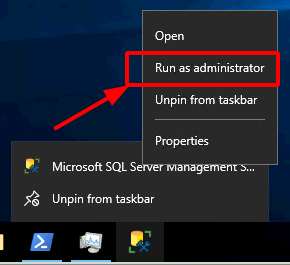
Right-click Start > Search > type in ‘ssms.exe’ > right-click Microsoft SQL Server Management Studio > Run as Administrator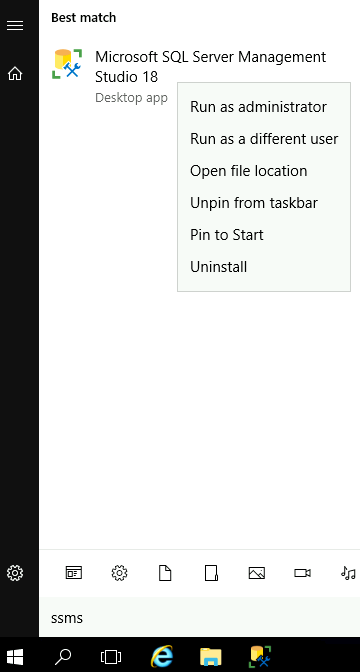
Authenticate using an sa account > New Query > paste this line:
/* Adding Principle into SQL sysadmin role */
exec sp_addsrvrolemember 'whatDomain\Domain Admins', 'sysadmin';
go
Observe a result similar to this:
Commands completed successfully.
Completion time: 2012-09-03T18:42:58.1788611-07:00
That’s it. There is no ‘Step 2.’ Fin.
# Alternative Method via PowerShell
$sa='sa'
$saPassword='whatpassword'
$domainAdmins="$env:USERDOMAIN\Domain Admins"

import-module sqlps
try{
    if($sa -and $saPassword){
        invoke-sqlcmd -username $sa -password $saPassword -Query "exec sp_addsrvrolemember '$domainAdmins', 'sysadmin'"
    }else{
        invoke-sqlcmd -Query "exec sp_addsrvrolemember '$domainAdmins', 'sysadmin'"
    }
}catch{
    write-warning $_
}
Alternative Graphical Interface Method:
Run Microsoft SQL Server Management Studio (ssms.exe) > authenticate as an sa > navigate to [Server Named Instance] > Security > right-click Logins > New Logins > set Login Name = YOURDOMAIN\Domain Admins & select ‘Windows authentication’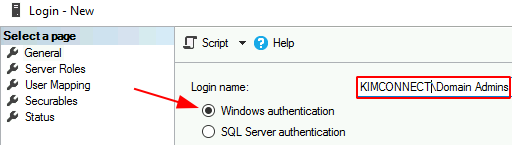
Click on Server Roles > put a check mark next to ‘sysadmin’ > click OK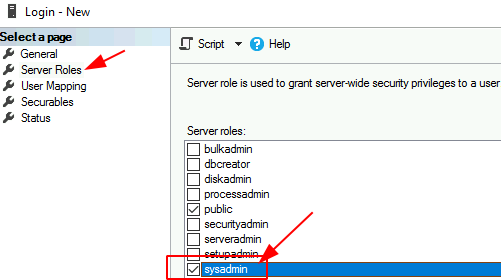
Visually verify that ‘Domain Admins’ has been added to the security group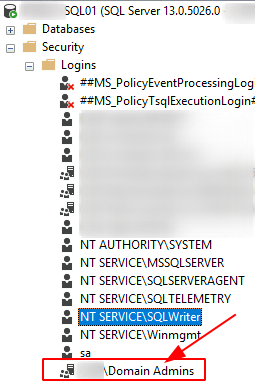
Troubleshooting:
Issue:
A member of the Domain Admins group could not logon to SQL Server even though such group has been granted the ‘sysadmin’ role on such database machine.
Resolution:
By default, Windows User Access Control (UAC) will associate the run-time of an un-elevated instance of SQL Server Management Studio in the context of a regular user, not ‘BUILTIN\Administrators’. To ensure that the GUI is initiated in the Admin contexts, one must right-click SSMS > select Run as Administrator. On then would members of the Domain Admins be granted access.

Frank
Thanks
kimconnect
yw!
Enrique
Run as Administrator worked for me. Thanks!
kimconnect
You’re welcome, Enrique!
Ehab
Thanks A lot.
kimconnect
You’re welcome