Error messages:
– We can’t sign into your account. This problem can often be fixed by signing out of your account and then signing back in. If your don’t sign out now, any files you create or changes you make will be lost.
– You’ve been signed in with a temporary profile. You can’t access your files, and files created in this profile will be deleted when you sign out. To fix this, sign out and try signing in later. Please see the event log for details…
Resolution:
– Log out of the problematic user session
– Log in with a different account with Administrator privileges
– Turn off fast startup: powercfg /hibernate off
– Rename the user profile folder (e.g. C:\Users\User1 to C:\Users\User1.bak)
– Run RegEdit
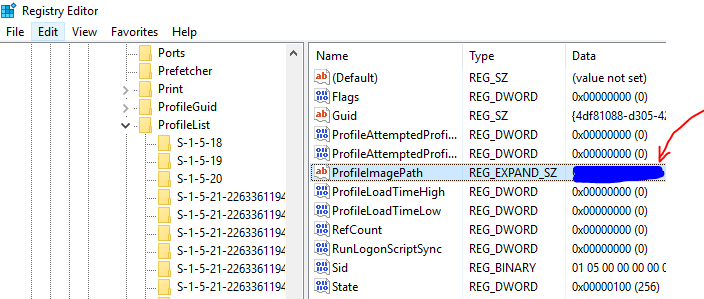
– Navigate to HKEY_LOCAL_MACHINE\SOFTWARE\Microsoft\WindowsNT\CurrentVersion\ProfileList
– Locate each profile with the String name ‘ProfileImagePath’ matching the username (e.g. C:\Users\User1)
– Right-click and delete the registry key (with folder icon) associated with the problematic user profile, include its sub-strings and DWORD’s
– Log in with the original user with profile issues to verify that a new profile has been generated without errors