Ubuntu and its variants are pre-packaged with Mozilla’s Firefox Web Browser. Although that is a fine Internet app (a true pioneer of worthy Internet browsers), Chrome has been the #1 choice for many users due to the amount of $$$ invested to ensure that it’s awesome. Instead of talking about history, let’s paste these commands onto your terminal emulator to add Chrome onto our Debian-based Linux machines with relative ease.
# Install the tools to get packages
sudo apt install -y gdebi-core wget

# Download the latest Chrome installation file for Debian
wget https://dl.google.com/linux/direct/google-chrome-stable_current_amd64.deb

# Install the downloaded package
sudo gdebi google-chrome-stable_current_amd64.deb

# Open Chrome from CLI
# Please note that Chrome would be available under the Internet apps group hereafter
google-chrome
If everything has gone well, the new icon should show up on the applications list similar to the image below.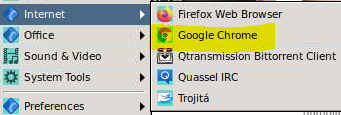
By the way, I’ve encountered an issue with Firefox freezing a VNC session whenever I make the attempt of dragging an image item from the browser onto a local directory, such as my XLDE Desktop. Although Chrome doesn’t enable me to save such an image with that maneuver either (Windows is more user-friendly in this regard), my logon session doesn’t become frozen when using the Chrome browser. That is just one of the many bugs that persuade me to favor Google over Mozilla.
