Posted On December 17, 2022

How to Set PowerShell Window and Prompt Title or Label

kimconnect 0 comments
blog.KimConnect.com >> Windows >> How to Set PowerShell Window and Prompt Title or Label

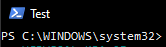
Have you ever wondered about changing the boring PS C:\Windows\system32> whenever a new window is opened in PowerShell? You’re in luck by finding this quick note. Here’s how you’d do it:

# Set Window title to match current machine name
$host.UI.RawUI.WindowTitle="PS $env:computername $env:username"
# Set Window prompt to match current machine name
function prompt {"PS $env:computername $env:username> "}

# Set color of label
function prompt{
Write-Host ("PS $env:computername $env:username> ") -nonewline -foregroundcolor Yellow
return " "
}

Leave a Reply

Your email address will not be published. Required fields are marked *

Related Post

How to increase the database size limit on Exchange 2003 SP2

Connect to the Server that is running Exchange 2003 SP2 Click Start > Run >…

Windows File System Symlink Settings

Issue: Shortcuts or symbolic links are inaccessible at the destination, after being synchronized (using robocopy,…

Example of a HipChat Server Installation

FQDN: hipchat.kimconnect.com Internal IP: 10.10.100.205 Public IP: 12.12.12.12   Firewall configurations: inbound TCP 443 inbound…
