Posted On September 8, 2021

ODBC Driver 32-bit & 64-bit

kimconnect 0 comments
blog.KimConnect.com >> Database >> ODBC Driver 32-bit & 64-bit
The 32-bit version:

Run: odbcad32.exe > check the list of installed 32-bit drivers as illustrated below (sample only)

The 64-bit version:

Run: odbcad64.exe > click on Add > select an appropriate DB driver (example below)
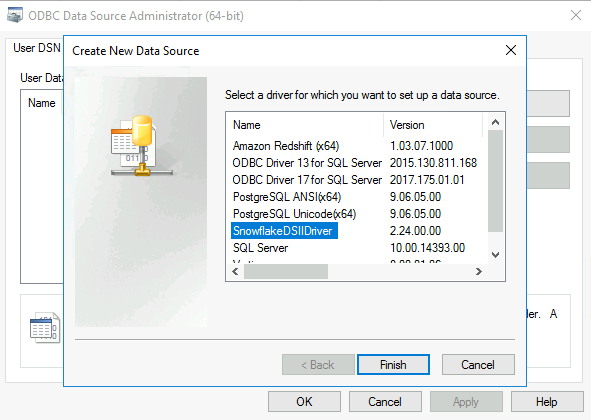
click Finish > Input additional connection info > OK > close the ODBC Data Source Administrator when done


Leave a Reply

Your email address will not be published. Required fields are marked *

Related Post

PowerShell: Invoke Backup SQL Database

Function to invoke SQL Backups on a Remote SQL Server: # invokeSqlBackup.ps1 # Version 0.0.1…

SQL: Use PowerShell to Validate if Database Exists

This function may be invoked remotely from a machine that has SQL-PS module installed. The…

Microsoft SQL Server Connection Timeout

Error Message: Resolution: a. Check SQL Server's Query Execution Timeout: SSMS > Login > Tools…
